








In a previous post, my colleague Gera walked through how to set up GraphQL subscriptions in Go using gqlgen. This can be used to keep track of real-time updates for data. In this post, we will cover how to extend our GraphQL implementation to add queries, which is how a client can fetch data from the GraphQL server on-demand.
At a tech company, there are often thousands of business-critical data points to keep track of. To support querying this data, REST APIs can become complex and difficult to maintain. This is where GraphQL queries come in! In GraphQL, you define your data and allow the frontend clients to query just the data they need. This allows for an API layer that’s composable, extensible and simple to use.
But first, some background:
What is Go?
Go is a compiled programming language with a lot of support for parallelization, making it an ideal candidate to build an API layer that’s expected to serve a lot of concurrent traffic. While it’s faster than alternatives such as Python, there could be a learning curve when adopting Go for your project. The patterns are different, such as static typing and receivers. Still, given the performance gains, the learning curve could be worth surmounting depending on your project.
What is gqlgen?
Gqlgen is a framework for implementing a GraphQL server in Go. It allows you to define your schema, and auto-generates resolver implementations. This reduces the amount of boilerplate you have to write. However, be careful with generated code - make sure you review and understand what it’s doing, and ensure that it’s covered by tests. Just like you would for any code that’s generated by an LLM, for example.
Now, let’s get started by defining our schema.
Defining the Schema
In the schema.graphqls file, add this:
type Query {
  """Fetches auctions by a list of auction IDs."""
  auctionsByIds(auction_ids: [Int!]!): [Auction!]!
}
This adds a query called auctionsByIds, which is defined as taking in a list of integers called auction_ids, and returning a list of Auction objects.
Run the generate command: go run github.com/99designs/gqlgen generate, and the file schema.resolvers.go should be updated with a resolver implementation, that’s initially stubbed out with just a panic call.
// AuctionsByIds is the resolver for the auctionsByIds query.
func (r *queryResolver) AuctionsByIds(ctx context.Context, auctionIds []int) ([]*model.Auction, error) {
   // insert logic here
}
In this method, we can add our code that does the business logic to retrieve the auction data, such as retrieving it from a downstream service, database or cache. This business logic is outside the scope of this blog post, so I will skip the details on that.
Testing the query
Compile your server with go build, and run the executable generated. Now you can test your query either with the command line, or with the GraphQL playground, which is hosted at localhost:8080.
Pasting this into the left-hand side:
query auctionsByIds {
  auctionsByIds(auction_ids: [5316536, 5308894, 5315713]) {
    id
    status
  }
}
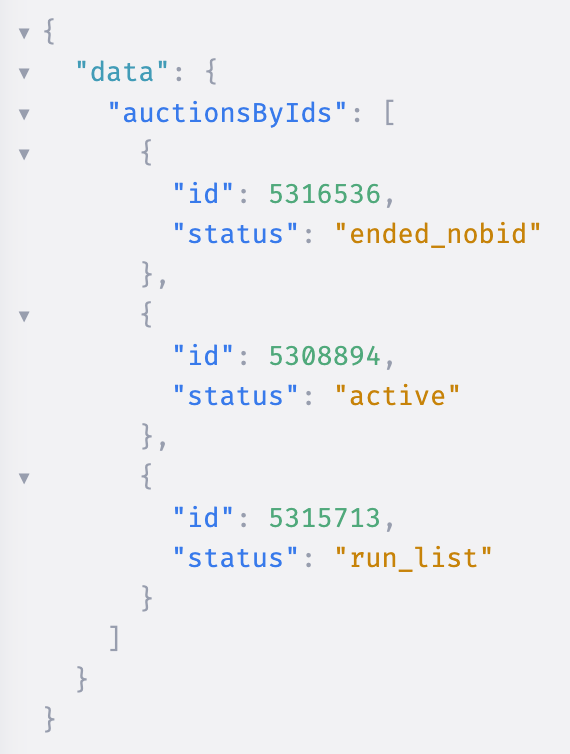
We can see that the data is returned! Here, we just requested 2 fields, but any combination of fields can be queried:
query auctionsByIds {
  auctionsByIds(auction_ids: [101, 102, 103]) {
    id
    seller
    buyer
    price
  }
}
This example demonstrates a simple query, but there’s a lot more you can do with GraphQL. Combine queries with mutations to build a complete API layer that drives your application. Use techniques like data loaders to batch requests, caching to minimize latency, and schema directives for more complex and custom logic. And most importantly, always be learning and trying new things!
Some more resources:
- Our previous post, on subscriptions
- Gqlgen documentation
- GraphQL documentation